The best one is the one that stops the mistakes you actually make. For most ADIs that means three things: it refuses double-bookings across the pupil, the instructor and the car; it sends lesson reminders without you lifting a finger; and it keeps the pupil's record and payments next to the lesson. DriveSchoolPro does all three, works on the web, iPhone and Android, and is free until 31 March 2027. Total Drive and My Drive Time are the established UK alternatives, and our comparison sets out how they differ.
The Driving Instructor Diary App That Won't Let You Double-Book
DriveSchoolPro is a diary app built for UK driving instructors. Day, week and month views, drag-and-drop rescheduling, clash checks across the pupil, the instructor and the car, and reminders that go out without you. Pupil records, payments and DVSA progress sit next to every lesson.
Web, iPhone and Android · Free until 31 March 2027 · No card needed
What is a driving instructor diary app?
What a driving instructor diary app should actually do
Every ADI has a diary system that works, mostly. A spiral-bound book in the door pocket, a shared Google Calendar, a notes app, a WhatsApp thread per pupil. The trouble is not booking a lesson. Anyone can write "Sam, 4pm, Tue". The trouble is everything that has to happen around that lesson: checking the car is free, remembering where Sam lives, reminding Sam the night before, recording what you covered, and knowing whether Sam has paid.
A driving instructor diary app earns its place when it does that surrounding work for you. When you are comparing ADI diary apps, these are the jobs worth testing on a real week of lessons:
- Show the shape of your week. Day, week and month views, so you can see today's run and next month's gaps without flicking pages.
- Make changes cheap. Moving a lesson should be a drag, not a rewrite, and the pupil should find out without you sending a separate message.
- Refuse clashes. Before a booking is saved, check that the pupil, the instructor and the car are all free.
- Keep the pupil next to the lesson. Address, phone number, notes and progress should be one tap from the slot.
- Chase people for you. Reminders should go out automatically, and payments should be recorded against the lesson.
- Work wherever you are. Plan the week on a laptop, run the day from your phone.
DriveSchoolPro was built around that list. It is a full driving school software platform, but for most solo instructors the diary is the part they open fifty times a day, so it is the part we have spent the most time on. The rest of this page goes through each job in turn, including the things it does not do yet.
Day, week and month views, with drag-and-drop
The diary has three views, and each suits a different moment in an instructor's day.
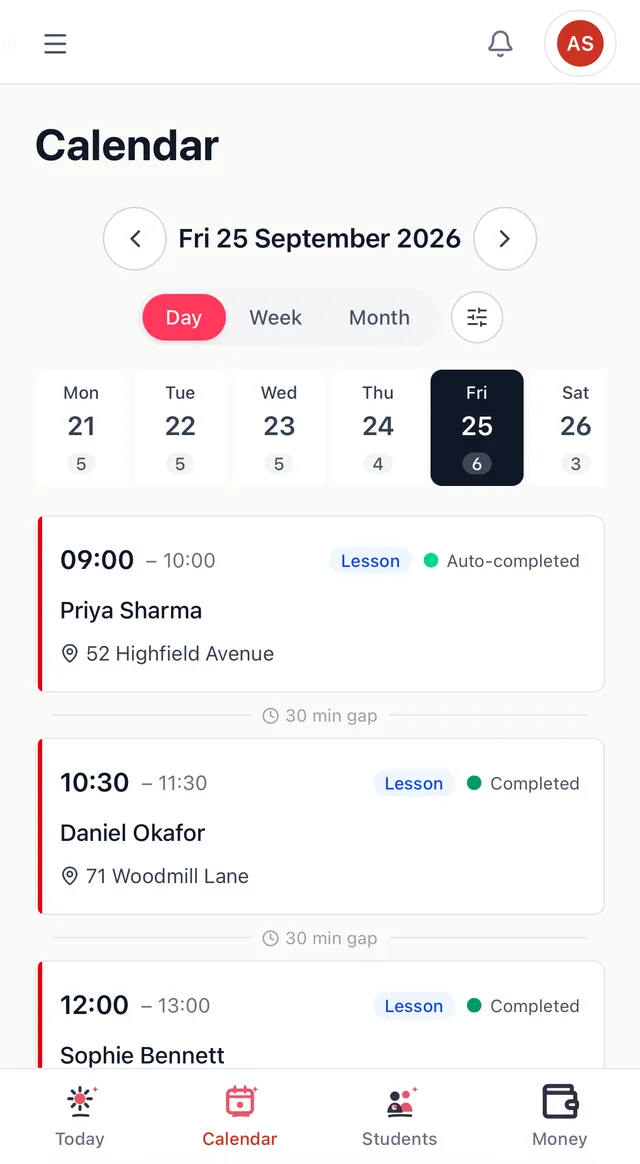
- Day view lists each lesson in order with the time, the pupil and the pick-up address, and marks the gap between lessons so you can see how long you have to get across town.
- Week view is where most instructors live. It shows every lesson in a time grid, colour-coded, with totals for bookings and cancellations along the top.
- Month view is a heatmap. Busy weeks look busy and thin weeks look thin, which makes the Tuesday afternoons that never fill impossible to miss.
To move a lesson, pick it up and drop it in the new slot. The change follows the lesson everywhere it appears: your diary, the pupil's own app and the reminder that goes out before the lesson. You can also book straight from the calendar with a quick booking panel, so there is no separate form to fill in.
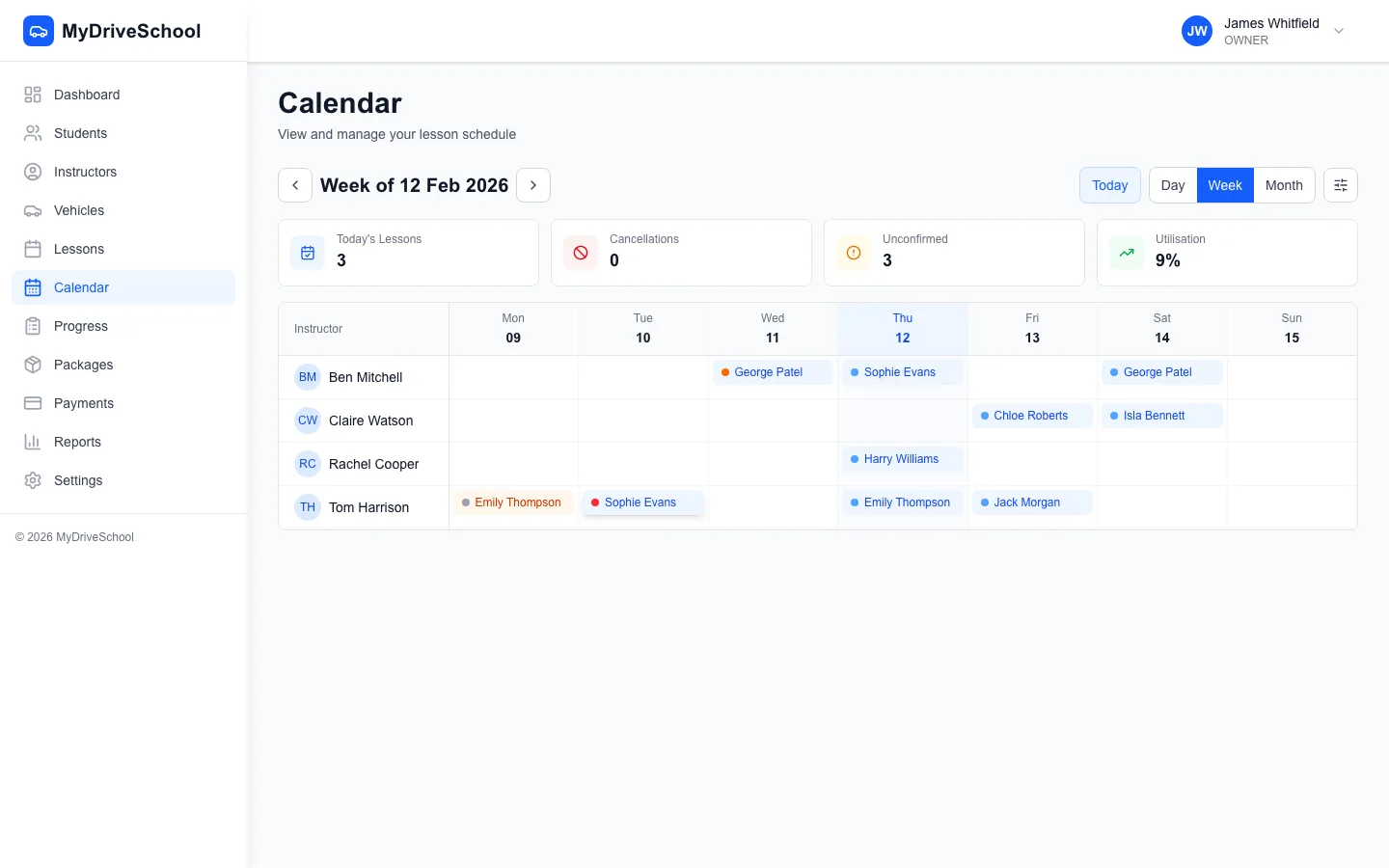
The week view, where most instructors plan from
The same diary runs in any web browser and in the DriveSchoolPro apps for iPhone and Android. Plan Sunday night's week on a laptop, then run Monday from your phone at the kerb. There is nothing to sync by hand, because it is the same diary in every place. More detail is on the scheduling feature page.
Clash checks across pupil, instructor and car
Most double-bookings are not carelessness. They happen because the fact you needed to check was somewhere else: in last week's message from the pupil, in another instructor's diary, or in your head as "the car's in for its MOT on Thursday". A paper diary cannot check any of that, and neither can a general calendar app.
DriveSchoolPro checks three things on every booking. Is this pupil already booked? Is this instructor already teaching? Is this vehicle already out? If any one of them is taken, the booking is stopped before it is saved, and you are told which of the three clashed and when. It is the difference between finding out now and finding out at 9am on a Saturday with a learner on the doorstep.
The vehicle check matters more than people expect. If you share a dual-controlled car with a colleague, or keep a spare for when yours is off the road, the diary knows which car each lesson is in. The app also tracks each vehicle's MOT, tax and insurance dates and alerts you before they lapse, so the car you have booked is a car you can legally teach in.
What it doesn't do yet
A repeating weekly series for a regular pupil is coming soon; for now each lesson is booked individually. There is no two-way sync with Google or Apple Calendar: the diary in DriveSchoolPro is the single source, which is what makes the clash checks trustworthy.
Pupil records, progress and AI lesson briefings
A diary entry is only useful if you know who you are picking up. In DriveSchoolPro every lesson links to the pupil's record: contact details, pick-up address, lesson history, notes, remaining lesson balance and progress. Tap the lesson, and it is all there.
Progress against the DVSA 27 skills
Progress is tracked against the official DVSA framework: all 27 driving skills across 8 categories, rated on a six-level scale. Logging a lesson takes a couple of taps per skill you worked on, so it happens at the kerb before you drive off rather than at eleven at night from memory. See progress tracking for how the ratings work.
A pupil app of their own
Each pupil gets their own app on iPhone, Android or the web. They see their upcoming lessons, where they stand against each of the 27 skills, and how many hours they have left. They can also book from the times you have made available, so the "are you free Thursday?" messages dry up. You can embed a booking widget on your own website too, so new enquiries pick a slot without messaging you first.
A briefing before every lesson
Before each lesson, DriveSchoolPro writes a three- or four-sentence briefing from your last notes and the pupil's current skill ratings, using Claude, Anthropic's AI. It is there to be read in the ten seconds before you knock on the door, so you start from what happened last time rather than from memory. It is particularly useful when another instructor took the previous lesson. Read more on the AI lesson briefings page.

The day view on a phone: who, where, and how long until the next one
Payments and automatic reminders
Getting paid from the diary
Pupils can pay by card through Stripe, from their own app or from a payment link you send. The money goes to your own Stripe account. You can sell lesson blocks, say ten hours paid up front, which draw down as lessons are taken so both of you can see the remaining balance. Cash, bank transfer and cheque can be recorded against a pupil too, so the ledger stays right however the money arrived. Card payments taken through DriveSchoolPro carry a 3% platform fee plus Stripe's own processing fee. The getting paid page has the detail.
Reminders you don't have to send
Automatic email reminders go out before every lesson (text and WhatsApp coming soon on Solo and School), and you choose how far in advance. When you drag a lesson to a new time, the reminder moves with it. Email reminders are on every plan, including Free. For more on cutting missed lessons, read how to reduce driving lesson no-shows.
Try the diary on next week's lessons
Set up in a few minutes. Keep your paper diary as a safety net until you trust it. Free until 31 March 2027, no card needed.
Get started free →Paper ADI diary vs a general calendar vs DriveSchoolPro
What each option does for a working driving instructor. A general calendar means Google Calendar, Apple Calendar or similar.
| Job | DriveSchoolPro | Paper diary | General calendar app |
|---|---|---|---|
| See the day, week and month at a glance | Flip pages | Day and week only | |
| Drag a lesson to a new slot | Rub out and rewrite | Partly (no pupil link) | |
| Warns you before a double-booking | Pupil, instructor and car | Your own events only | |
| Pupil records next to the lesson | Separate notebook | ||
| Automatic lesson reminders to pupils | Email (text and WhatsApp coming soon) | ||
| Pupils book their own slots | Portal and booking widget | ||
| Card payments and lesson blocks | |||
| DVSA 27-skill progress per pupil | Hand-written | ||
| Shared diary for a multi-instructor school | One book per car | Shared calendars, no clash checks | |
| Survives being left in the car on a hot day | Usually |
A paper diary is not a bad tool. It never runs out of battery and nobody has to train you to use it. Where it falls down is everything joined to the lesson: it cannot remind the pupil, check the car, take a payment or show you a month of gaps. A general calendar app fixes the battery and the backup, but it does not know what a pupil, a vehicle or a DVSA skill is. A dedicated driving lesson diary app is worth it once the admin around your lessons starts taking evenings. If you are making that move, our guide to switching from a paper diary walks through the first fortnight.
A shared diary for multi-instructor schools
The same diary scales from one instructor to a school. On the School plan every instructor appears in a shared, colour-coded diary, and the clash checks run across all of them. If a pupil is already booked with one instructor, another cannot book them into the same slot. If two instructors share a car, the diary will not let both take it out at once.
That shared view is what makes cover lessons painless. When an instructor is off sick, the office can see who has space, move the lesson by dragging it into another instructor's column, and the pupil's reminder and app update to match. The covering instructor opens the same pupil record, sees the same DVSA progress and gets the same AI briefing, so the pupil does not spend ten minutes explaining where they got to. Each instructor can set their own working hours and availability, and pupils booking from their app only see times that are genuinely free.
For the wider picture of running a school, including instructor management and reporting, see the driving school management software guide and the scheduling software guide.
What the diary app costs
DriveSchoolPro is free for everyone until 31 March 2027 while it is in early access. Every feature on this page is included, for solo instructors and schools, and no card is needed to start.
From 1 April 2027 there's a permanent Free plan (1 instructor, up to 60 lessons a month, every feature including AI), Solo at £22 a month, and School at £22 a month plus £10 per extra instructor. No VAT is charged.
- Free: £0 for 1 instructor and up to 60 lessons a month, with every feature including AI lesson briefings.
- Solo: £22 a month for one instructor with unlimited lessons. Text and WhatsApp reminders coming soon.
- School: £22 a month plus £10 for each extra instructor. Text and WhatsApp reminders coming soon.
Instructors who add a card by 1 March 2027 can lock in founding prices for 24 months. The full breakdown is on the pricing page.
How DriveSchoolPro compares with other ADI diary apps
The two diary apps UK instructors most often mention are Total Drive and My Drive Time. Both are established, both have a pupil app, and both list features DriveSchoolPro does not have yet, such as broadcasting a cancelled slot to pupils and free migration of your existing records. DriveSchoolPro differs on AI lesson briefings, progress built on the DVSA 27 skills, vehicle-aware clash checks and Google review requests when a pupil passes.
We have written a neutral Total Drive vs My Drive Time comparison that sets the three side by side using each vendor's own website, and there are one-to-one pages for DriveSchoolPro vs Total Drive and DriveSchoolPro vs My Drive Time. The honest advice is the same whichever you pick: run it alongside your current diary for a week of real lessons, try to double-book yourself, move a lesson, and see whether the pupil hears about it. That week tells you more than any feature list.
Driving instructor diary app: common questions
Yes. DriveSchoolPro is free for every instructor until 31 March 2027, with no card needed. From 1 April 2027 there's a permanent Free plan (1 instructor, up to 60 lessons a month, every feature including AI), Solo at £22 a month, and School at £22 a month plus £10 per extra instructor. No VAT is charged. So a part-time instructor teaching up to 60 lessons a month can keep using the diary for nothing after the early-access period ends.
Reminders go out automatically before every lesson, and you choose how far in advance. Today they go by email, on every plan including Free. Text and WhatsApp reminders are coming soon on the paid Solo and School plans.
Not yet. A repeating weekly series is coming soon. For now each lesson is booked individually from the calendar, which takes a few seconds per lesson.
Not as a two-way feed. DriveSchoolPro is where the diary lives, and keeping it as the single source is what makes clash checking reliable. Pupils who book through your public booking page get an add-to-calendar link for their own lesson.
Yes. On the School plan every instructor has their own column in a shared, colour-coded diary, and each booking is checked against the pupil, the instructor and the vehicle. From 1 April 2027 the School plan is £22 a month plus £10 for each extra instructor, and it is free until then.
Run both for a week or two. Add your current pupils one at a time as you teach them, book their next lessons into the app, and keep the paper diary as a safety net until you trust the new one. Most instructors stop opening the paper book within a fortnight.
Put next week in the diary app
Web, iPhone and Android. Clash checks, automatic reminders, pupil records and payments in one place.
Get started free →Free until 31 March 2027 · No credit card required · Cancel anytime