You create a package with a name, a number of lessons, a price and, if you like, how long it is valid for. A pupil buys it, and each lesson they take counts one off the balance until it runs out. Both of you can see how many are left at any time.
Paid up front
Lesson packages and block bookings that keep their own count.
Selling lessons in blocks is good for everyone: the pupil gets a better price and you get paid up front, which is the most reliable cure for cancellations there is. The awkward part is the counting. "How many have I got left?" should not need a notebook, a spreadsheet and a guess. Lesson packages keep the count for you, and show it to the pupil too.
Get started free →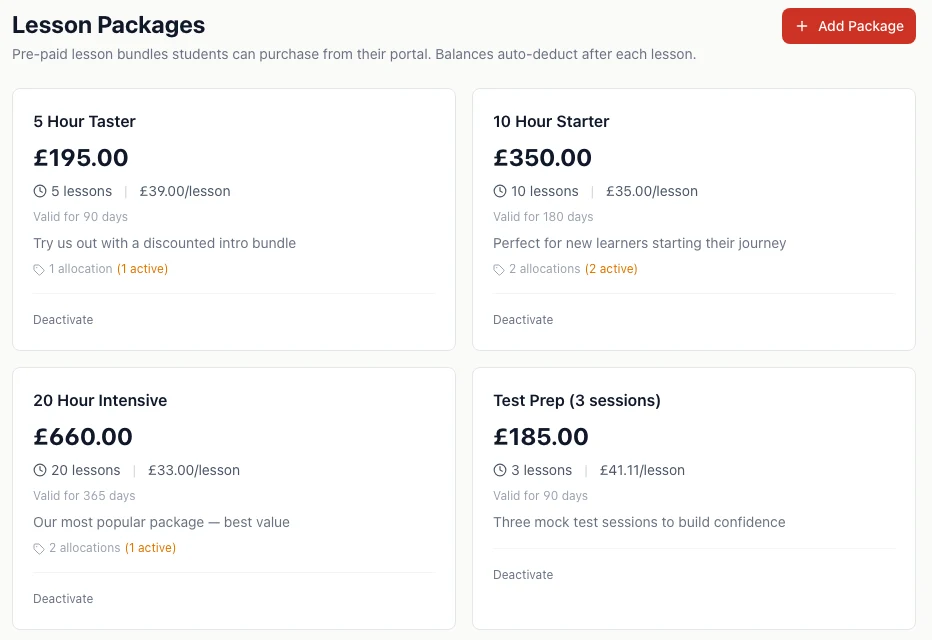
Set up the blocks you sell
Each package has a name, a short description, a number of lessons, a price and an optional validity period, such as 90 days for a taster or a year for a big block. It can cover any lesson type or just one, so a mock-test package can only be spent on mock tests. The price per lesson is worked out and shown for you, which makes the saving on a bigger block easy to see.
Pupils buy them on their phone
Tick a package as available and it appears in the pupil app, where pupils can buy it by card. The money goes to your Stripe account, less card and platform fees, and the balance is on their account straight away, ready to book against.
Prefer bank transfer or cash? Record the sale on the pupil's record instead, with the amount actually paid, and the balance works exactly the same way.
A balance that counts itself down
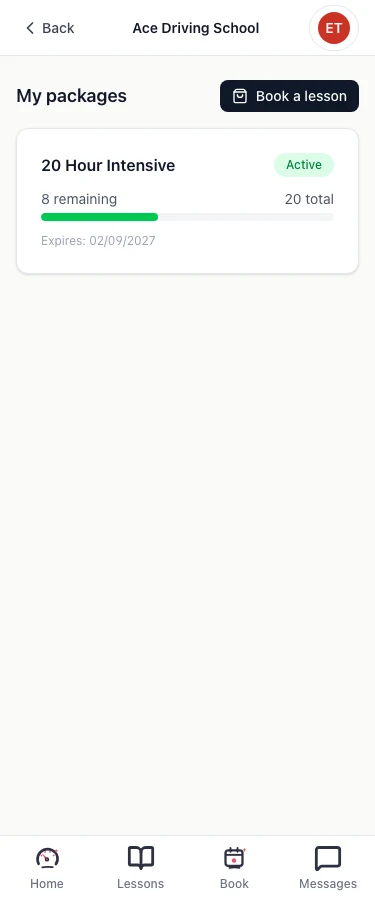
Book a lesson against a package and one comes off. If a pupil books through the app using their package, it comes off when the lesson is completed. Cancel the lesson and it goes back. You never have to work out the balance, and neither does the pupil: they can see what is left, and when it expires, in their app.
When a pupil is down to their last lesson, their record tells you so, which is the moment to mention the next block. An expired package can no longer be used, and the owner can extend the date if there is a good reason.
What it does not do yet
It does not send pupils a message when they are running low or a package is about to expire; that prompt is for you, in the app. Pupils can only buy online by card, through Stripe. And a refund made directly in your Stripe account does not remove the lessons from the package automatically. You are told to check it, but you adjust it yourself.
How it works
- 1
Create your packages
Number of lessons, price, and how long it lasts.
- 2
Sell them
Pupils buy by card in their app, or you record a cash or bank-transfer sale.
- 3
Book against the balance
Each lesson counts one off; a cancelled lesson puts it back.
Lesson package questions
Yes, by card in the pupil app or portal, once you have connected Stripe and ticked the package as available to buy. If Stripe is not connected, pupils are asked to contact you to buy one instead.
Related: How card payments work
Yes. From the pupil's record you add the package and record how they paid: cash, bank transfer, card or online. You enter the amount actually paid, so a part-payment is recorded as a part-payment.
When you book a lesson against a package yourself, it comes off at booking. When a pupil books through the app using their package, it comes off when the lesson is completed. Either way, cancelling the lesson puts it back.
You choose: a package can cover any lesson type, or one specific type, such as a mock test package that can only be used for mock tests. Each lesson counts as one, whatever its length.
Not by message at the moment. You see a prompt on the pupil's record when they are down to their last lesson, and pupils can see their own balance and expiry date in the app. Expired packages can no longer be used, and the owner can extend an expiry date if needed.
Get paid for the next ten lessons today
Free until 31 March 2027. No card, no contract, cancel any time.
Get started free →Related
- Getting paid → — card payments, invoices and who owes you
- Pupil app → — where pupils buy and track their packages
- How to stop driving lesson no-shows → — why paying up front works
- Driving instructor accounting software → — invoicing and the money side