Not through the website widget. A visitor picks a lesson type, an instructor (or anyone available), a day and a time, then enters their name, email, phone number and pick-up address. Pupils you have already invited use the portal instead, where they log in, see their own lessons and book from there.
Between lessons
Online booking for driving lessons, into the times you are actually free.
Enquiries do not arrive at convenient times. They arrive at ten at night, or while you are halfway round a roundabout with a learner, and a good share of them go to whichever instructor answers first. Online booking lets a new pupil, or one of your existing ones, pick a slot themselves, at any hour, without you being involved.
Get started free →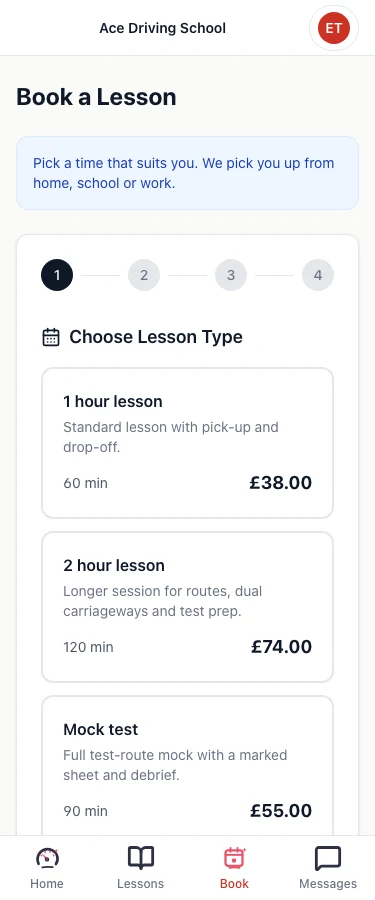
Two ways for pupils to book
From your website. Paste a short snippet into your site and a booking button appears. It opens a booking window without taking the visitor away from your page. They choose a lesson type, an instructor or "any available", a day and a time, and leave their name, email, phone number and pick-up address. No account, no password, nothing to remember. You choose the button's wording, colour and which corner it sits in.
From their portal. Pupils you have invited log in to see their lessons, progress and invoices, and book the next one from the same place. They get a link to manage the booking afterwards, and where you allow it they can use prepaid lesson hours rather than paying again.
Only the times you would say yes to
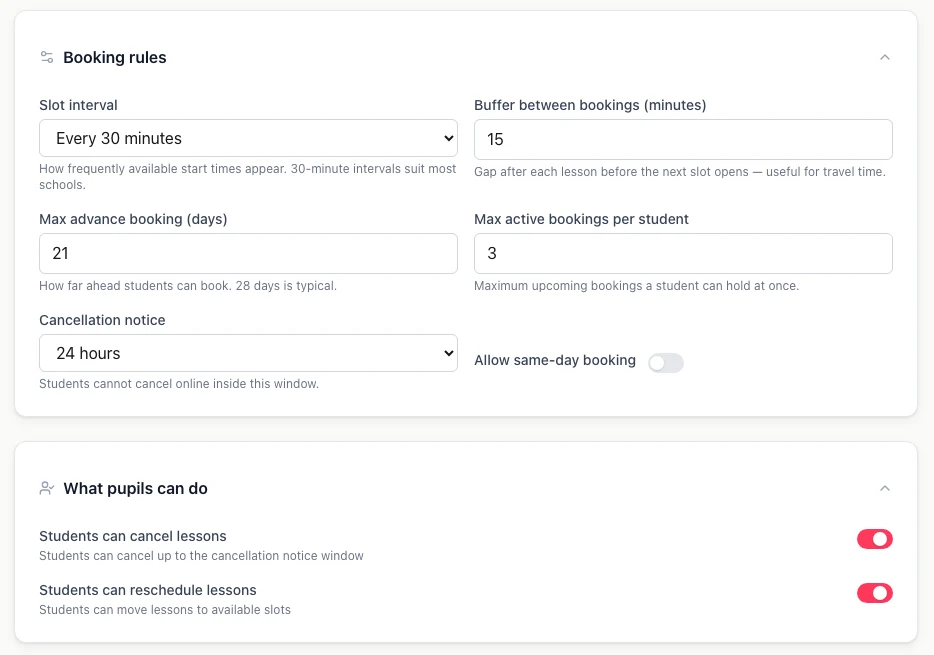
The risk with letting people book themselves is that they book things you would never have agreed to. So the slots shown come straight from your working hours and your diary, and you set the rules around them:
- Slot length: start times every 15, 30 or 60 minutes.
- Travel buffer: up to two hours kept clear after each lesson.
- How far ahead: from 1 to 365 days.
- Same-day booking: on or off.
- Pupil limit: how many upcoming bookings one pupil can hold at once.
- Cancellation notice: one hour up to 72 hours, with separate switches for whether pupils can cancel or reschedule online.
Every booking is checked against the pupil, the instructor and the car in the same way as one you make yourself, so an online booking cannot double-book anything.
What it will not do
It is worth being plain about the edges. Bookings are confirmed immediately, so there is no approve-first step. Pupils do not pick the car. There is no text-message booking. And the refund policy you write is shown to pupils as wording; it does not decide refund amounts for you. If any of those matter to how you run things, you will want to know before you rely on it rather than after.
How it works
- 1
Set your hours and lesson types
Working hours, the lessons you offer and their prices. This is what decides which times pupils are shown.
- 2
Choose your rules, then switch it on
Notice period, how far ahead, buffers. Online booking is off until you turn it on.
- 3
Share the link or add the button to your site
Copy the snippet onto your website, or send pupils the portal link. Bookings appear in your diary as they are made.
Online booking questions
Yes. You set how far ahead pupils can book (anywhere from 1 to 365 days), whether same-day booking is allowed, how many upcoming bookings one pupil can hold at once, and a buffer of up to two hours after each lesson for travel time. Times are only offered when you are actually free.
Not at the moment. Online bookings are confirmed straight away and land in your diary, so the protection is in the rules you set up front rather than an approval step. If you want a say in who books, keep the widget switched off and invite pupils to the portal one at a time.
You choose the notice period, from one hour up to 72 hours, and whether pupils may cancel or reschedule online at all. Inside the notice window they cannot cancel from the portal and have to contact you, so the decision stays with you.
Yes, if you have connected Stripe to take card payments and switched on payment at booking. A pupil with a lesson package can use their prepaid hours instead, from the portal. Without Stripe connected, bookings are confirmed without taking a payment.
Related: How card payments work
No. Pupils pick a lesson type, an instructor and a time. Which vehicle is used is for you to decide, and the diary checks that the car is not already booked.
Yes. Everything is free until 31 March 2027, and the permanent Free plan covers up to 60 lessons a month. Check the pricing page for the full picture.
Related: See pricing
Let the next pupil book while you are teaching
Free until 31 March 2027. No card, no contract, cancel any time.
Get started free →Related
- Scheduling → — the diary every booking lands in
- Getting paid → — card payment and lesson packages
- Driving school scheduling software → — the longer guide
- Driving instructor software → — everything a solo ADI needs