It stops you. Every booking is checked three ways at once — the pupil, the instructor and the vehicle — so a clash is caught as you make it rather than discovered on the morning. You get told which of the three is already committed and when.
Sunday night
Move a lesson. Everything else catches up.
A diary is easy to keep and hard to change. One pupil moves their Tuesday, and suddenly you are rubbing out pencil, checking whether the car is free, working out whether you can get from Didsbury to Sale in twenty minutes, and then messaging three people. The change takes a second. The consequences take twenty minutes.
You can't double-book. It won't let you.
Most diary clashes are not carelessness. They happen because the thing you need to check lives somewhere else — the pupil's last message, the other instructor's column, which car is in for its MOT. Checking all three every time is the part nobody keeps up.
DriveSchoolPro checks all three on every booking: is this pupil free, is this instructor free, is this vehicle free. If any one of them is not, you are told which, and when they are committed, before the booking is saved. It is the difference between finding out now and finding out at 9am on a Saturday with a learner on the doorstep.
The whole week on one screen, colour-coded
Day, week and month views. The week view is the one most instructors live in: every lesson across every instructor, colour-coded, with the totals for bookings, cancellations and utilisation along the top so you can see how the week is actually going without adding anything up.
Rescheduling is a drag. Pick the lesson up, drop it where it belongs, and the pupil's portal and their reminder move with it. You are not updating the same change in three places and hoping you remembered the third.
The month view shows you where the money isn't
The month view is a heatmap. Dense weeks look dense and thin weeks look thin, which makes the gaps obvious — the Tuesday afternoons that never fill, the week in half term you could have sold twice over. Most instructors find they are not short of demand so much as short of visibility about where the holes are. Seeing a month at a glance is what turns that into something you can actually sell into.
Today's diary, on your phone
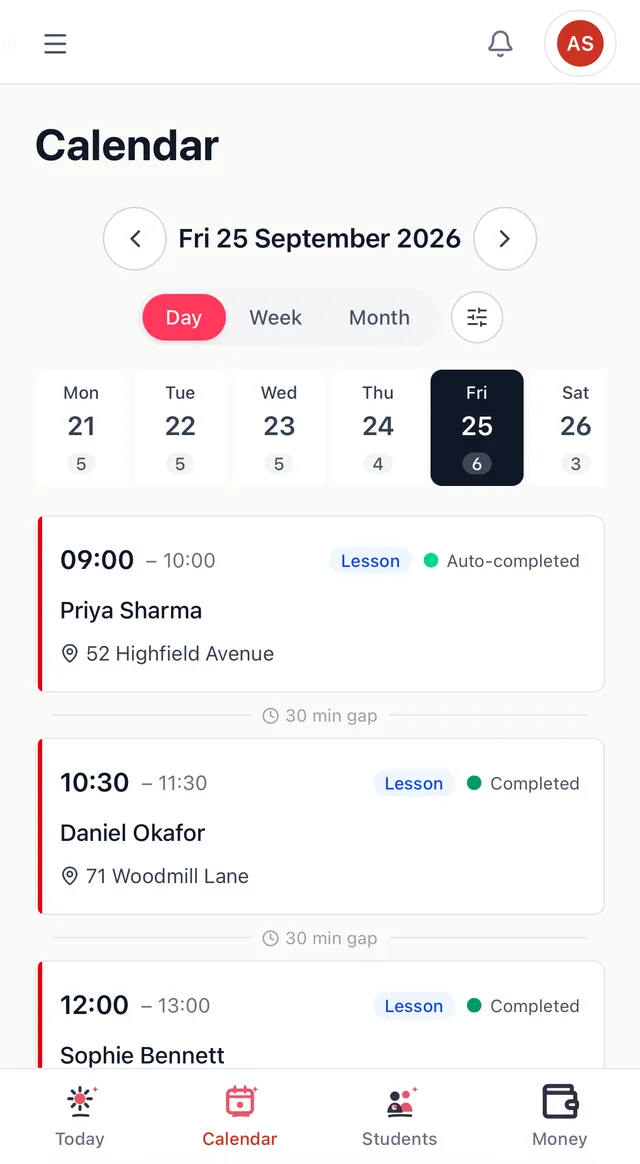
The same diary, in your pocket. Day, week and month views are a tap apart, with a strip of the week's days along the top showing how many lessons each one holds.
The day view lists each lesson in order — time, pupil and pick-up address — and marks the gap between them, so you can see at a glance how long you have to get to the next pupil.
Pupils book their own lessons
No more "are you free Thursday?" messages at ten at night. Pupils open their portal, pick an instructor (or anyone available), and choose from the times you are actually free.
They confirm the price and pick-up address, get a booking reference, and the lesson lands in your diary.
How it works
- 1
Set your hours and your cars
Tell it when you work, where you pick up from, and which vehicles you use. This is the part that makes the conflict checking work, and it is a one-off.
- 2
Book from the calendar
Click a slot and book it. Pupils can book their own from the portal, or through a booking widget embedded on your website. See how online booking works.
- 3
Drag when things move
Because they will. The diary, the portal and the reminder all follow the lesson.
Scheduling questions
Yes. Rescheduling updates the lesson everywhere it appears — your diary, the pupil's portal, and the reminder that goes out before the lesson. You are not re-typing the change into WhatsApp afterwards.
Not as a subscribed feed. DriveSchoolPro is where your diary lives, and keeping it the single source is what makes the conflict checking mean anything. Pupils booking through your public booking page do get an add-to-calendar link for their lesson, so it lands in whatever calendar they use.
Not yet — recurring lesson series is coming soon. For now, regular slots are booked individually, which takes a few seconds each from the calendar.
An email reminder goes out automatically before every lesson, and you control how far in advance. WhatsApp reminders are coming soon.
Related: Our messaging policy
Yes. Pupils can book from their portal, and you can also embed a booking widget on your own website so new enquiries pick a slot without messaging you first. Your availability rules decide what they are offered.
Get your Sunday night back
Free until 31 March 2027. No card, no contract, cancel any time.
Get started free →Related
- Getting paid → — pupils who have paid up front don't cancel on Sunday night
- Progress tracking → — what to teach in the slot you just booked
- Driving school scheduling software → — the longer guide
- Driving instructor diary app → — what an ADI diary app should do, and paper vs app