27
DVSA Skills Tracked
Across 8 categories, on a 6-level scale (Not Started to Reflection)
Driving school student management software centralizes pupil records, DVSA progress tracking, driving test readiness, scheduling, payments, and reporting into one integrated system — purpose-built for UK ADIs.
Last updated: February 2026 | Reading time: 12 minutes
What you get with DriveSchoolPro — no industry estimates, just what the product does.
Across 8 categories, on a 6-level scale (Not Started to Reflection)
From Not Started through to Reflection, recorded after every lesson
Every staff booking checks student, instructor and vehicle availability
Free during early access — no per-student fees
No card required, cancel anytime
Per week — based on early user feedback
Driving school management software is a comprehensive platform that handles all aspects of running a driving school: student records, scheduling, payments, instructor management, communication, and business reporting. It replaces the patchwork of spreadsheets, paper files, and separate tools that many schools rely on.
The goal is simple: spend less time on admin and more time growing your business and teaching students to drive safely.
Complete student profiles with DVSA competency tracking (8 categories, 27 skills), per-student notification preferences, and student portal access.
Drag-and-drop calendar with day/week/month views, three-way conflict detection, and automated reminders. Recurring lesson series coming soon.
Invoice lifecycle management, payment recording (cash, bank transfer, cheque), lesson packages, and email delivery, plus card payments through Stripe pay-links. See how this fits alongside driving instructor accounting software.
Revenue reports, pass rates, instructor performance, and business insights.
Related: Driving School Scheduling Software Guide
Managing student information effectively is at the core of every successful driving school. Good software makes this effortless.
Each student should have a comprehensive profile containing:
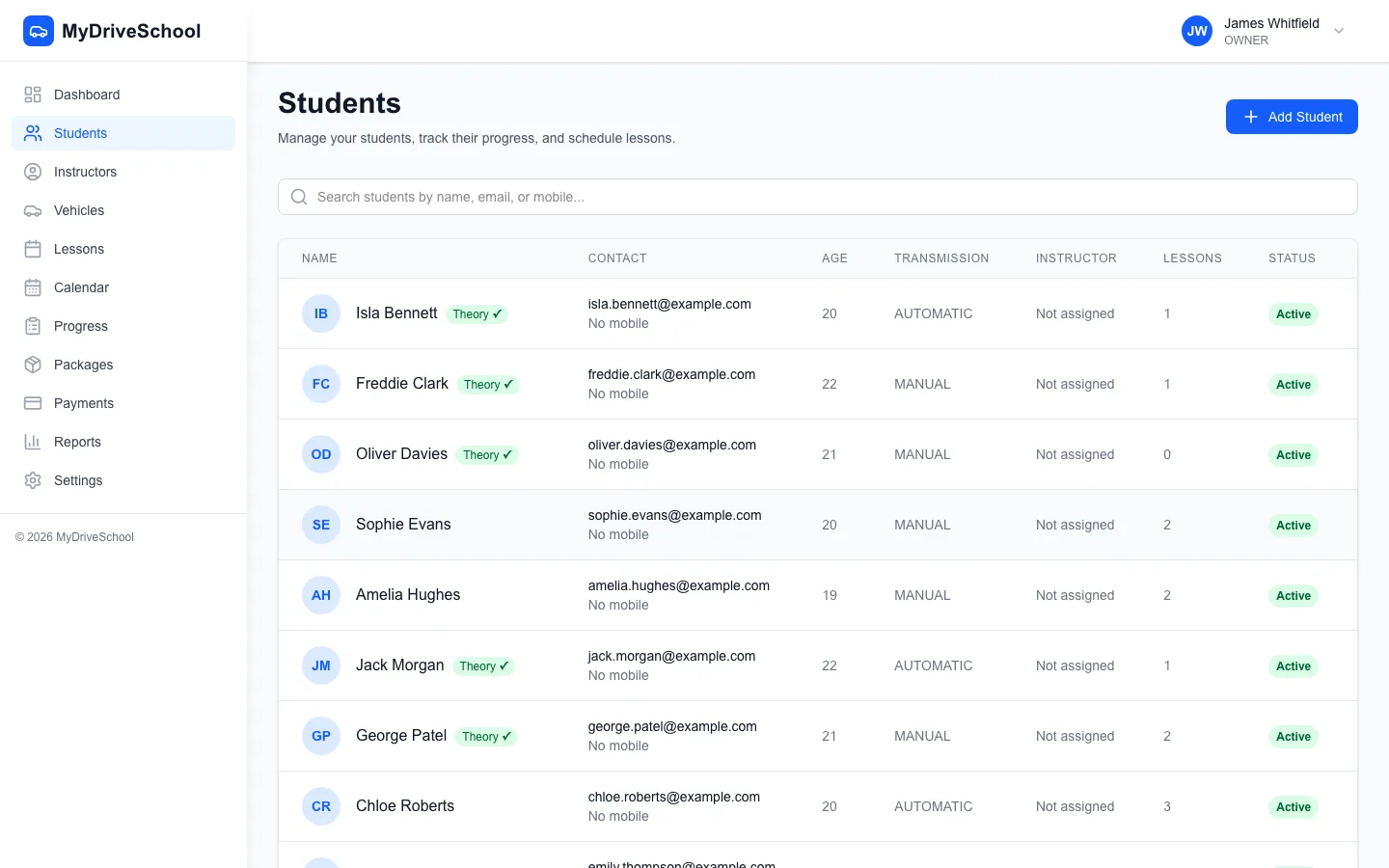
Student records with search, grouped by what needs your attention
Track student progress against the full DVSA competency framework:
This ensures consistency across multiple instructors and gives students clear visibility into their progress.
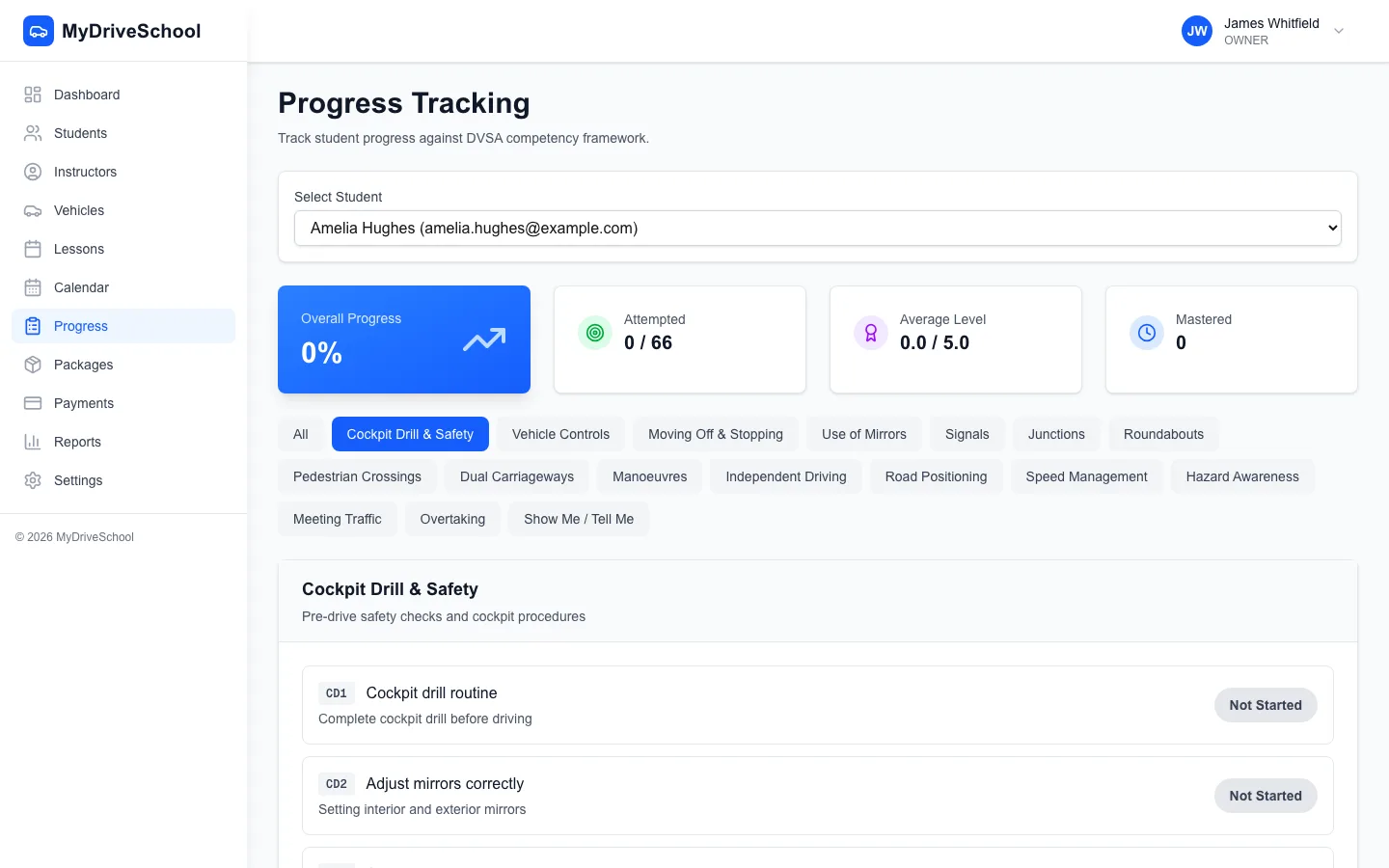
DVSA competency tracking with 8 categories and 6-level proficiency scale
Related: Student Management for Driving Schools: Complete Guide
Students get their own secure login to self-serve:

Student DVSA progress view on mobile
A dedicated parent/guardian portal for minor students is on our roadmap.
Managing money shouldn't be complicated. Good management software handles payments smoothly.
Record payments and manage invoices through a complete workflow:
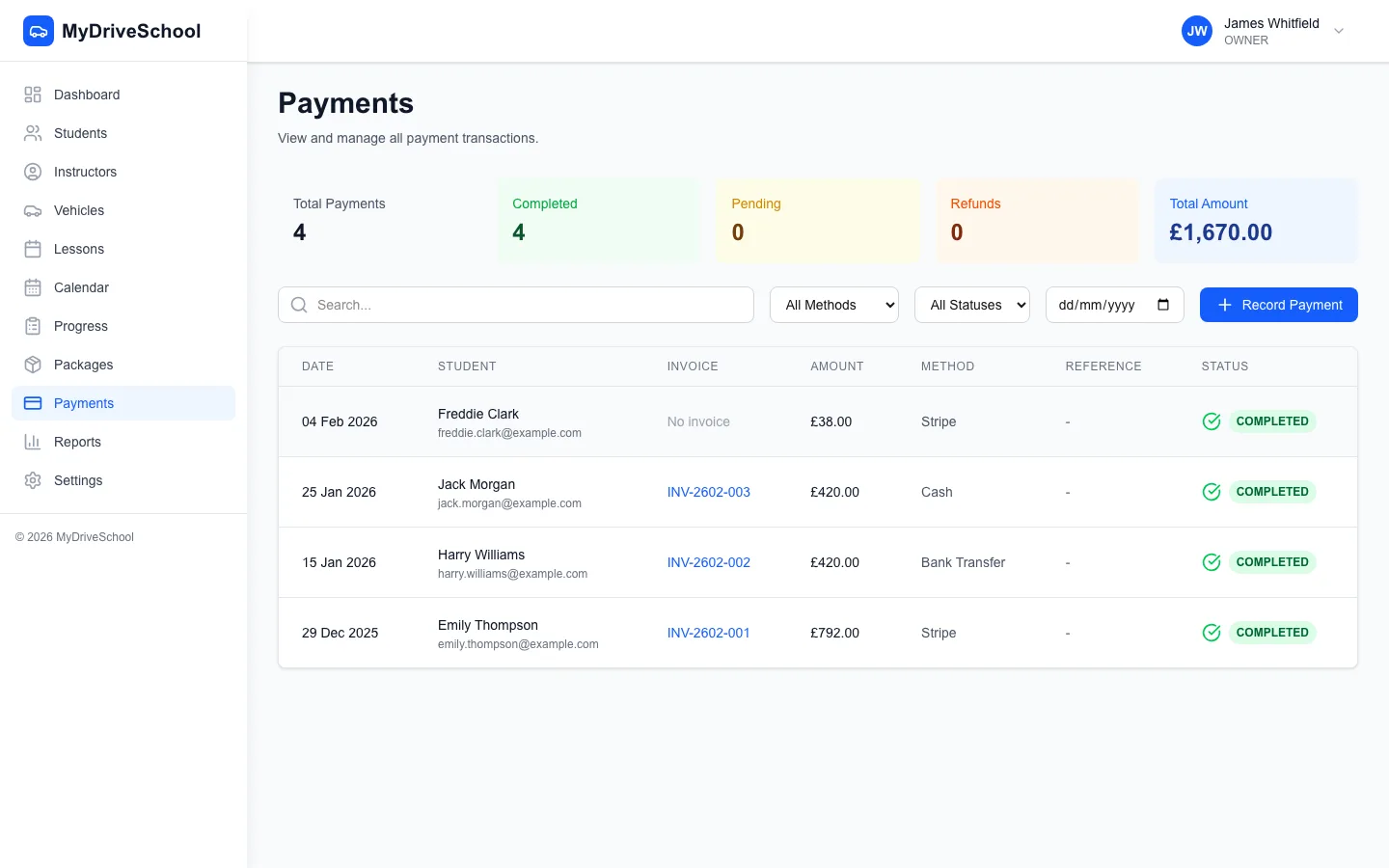
The Money screen: outstanding balances, overdue invoices and one-click payment reminders
Take card payments online
Send invoices with Stripe pay-links so pupils can pay by card, alongside manual recording of cash, bank transfer and cheque. We charge 3% on card payments you collect, and Stripe's standard processing fee applies on top.
Sell lesson packages (e.g., 10 lessons at a discount) and track:
Related: How to take driving lesson payments online
Student management and driving test management are two halves of the same job. Once you can manage each student's driving test from the same record that holds their DVSA progress, lessons, and payments, nothing falls through the cracks. DriveSchoolPro keeps every pupil's driving test student records — DVSA readiness today, with test bookings and results coming soon — attached to their profile, so the path from first lesson to test pass is one continuous, visible journey rather than a separate spreadsheet you have to cross-reference.
Recording each practical test booking — date, test centre and test type — directly against the student, with upcoming tests surfaced on your dashboard, is coming soon. Today the same record already holds their DVSA progress, lessons and payments.
For every student approaching their test date, the system highlights a DVSA readiness score drawn from their progress across the 27 skills (8 categories, 6-level scale). That tells you, at a glance, which pupils are genuinely test-ready and which still have weak competencies to shore up — so you can manage each student's driving test preparation and focus final lessons exactly where they matter most. It is the difference between booking a test on a hunch and booking it on evidence.
Progress is recorded against the DVSA framework after each lesson, so a pupil's readiness builds from evidence rather than memory. Over time you can see how each pupil is progressing, and pupils can follow along in their own portal. Logging test bookings and results against a pupil's record, and rolling those up into your school's first-time pass rate, is coming soon.
Related: Driving School Scheduling Software for booking the lessons that get students test-ready.
Every pupil has a complete record — contact details, DVSA progress, lesson history, notes and a running balance — so whoever teaches them next has the whole picture without a handover call. Document storage is coming soon.
As your school grows, managing instructors becomes more complex. Software helps you stay organised.
Give instructors their own login with role-based access (Owner, Manager, Instructor, Staff) to:
Send a pupil a quick update in one tap — running late, on my way, arrived — without digging out your phone and typing it out. Automated email reminders go out before every lesson (WhatsApp coming soon), with configurable timing and full delivery logs so you can see exactly what was sent and when.
When you mark a practical pass, DriveSchoolPro can email the pupil a Google review request at the moment they are happiest, and keeps a record of who has already been asked so nobody gets chased twice.
You can't improve what you don't measure. Good reporting helps you make better business decisions.
A good dashboard shows key metrics at a glance:
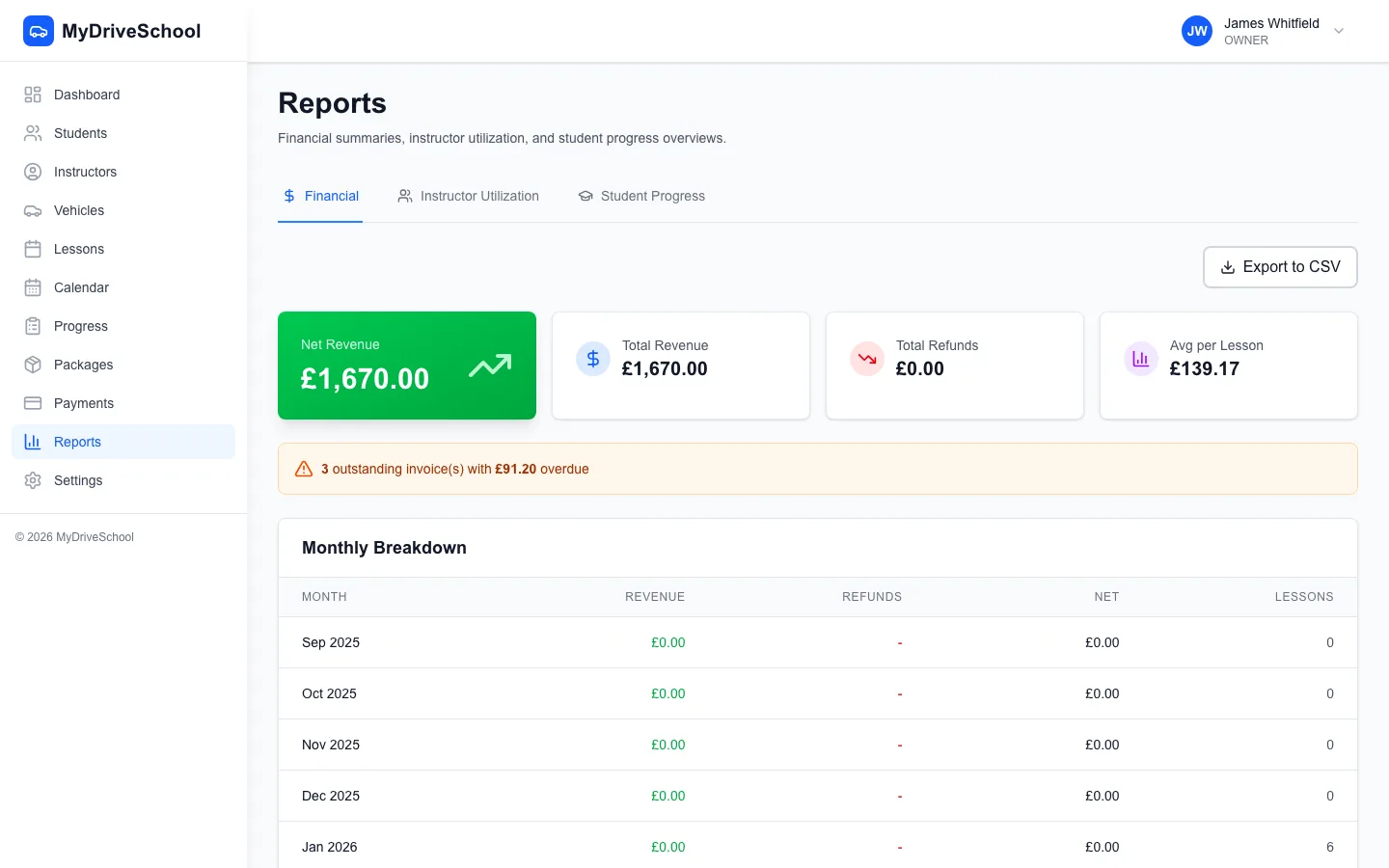
Reports: what needs attention, and how each instructor is doing
Before investing in software, understand your potential earnings and costs. Our free calculator shows your effective hourly rate, break-even utilisation, and profit projections with UK industry benchmarks.
Calculate Your Revenue & Earnings| DriveSchoolPro | Generic Tools | Spreadsheets | |
|---|---|---|---|
| DVSA Competency Framework (27 Skills) | |||
| Invoicing & Payment Recording | |||
| Instructor Management | |||
| Student Self-Service Portal | |||
| Business Analytics & Reports | |||
| Automated Reminders (Email) | |||
| Package Sales & Tracking | |||
| Role-Based Instructor Access | |||
| Vehicle Compliance Tracking | |||
| DVSA Test Date Tracking | |||
| Driving Test Tracking & Pass Rates | |||
| Student Records & Lesson History | |||
| Student Financial Ledger | |||
| Customisable Message Templates | |||
| Lesson Outcome Recording Wizard | |||
| Online Booking Widget | |||
| Guided Onboarding Wizard |
Driving school management software is an all-in-one platform that handles student records, scheduling, payments, instructor management, and reporting. It replaces spreadsheets and paper records with automated digital systems that cut admin time — early users report saving 10+ hours a week — and bring student records, scheduling, payments, and reporting into one place.
DriveSchoolPro is currently free — until 31 March 2027 — while we're in early access, for independent ADIs and multi-instructor schools alike, with no per-user or per-student fees. No card is required. From 1 April 2027 there's a permanent Free plan (1 instructor, up to 60 lessons a month), Solo at £22 a month, or School at £22 a month plus £10 per extra instructor, with no VAT charged.
Yes. DriveSchoolPro includes the full DVSA competency framework with 8 categories and 27 skills, each tracked on a 6-level proficiency scale (Not Started to Reflection). This provides cross-instructor continuity — any instructor can pick up exactly where the last left off. Students view their own progress through their self-service portal.
Yes. Record payments via cash, bank transfer, and cheque. Create invoices with line items, track status through a full lifecycle, and send to students via email. Sell lesson packages with configurable hours, pricing, and expiry dates. Refund processing is also supported. You can also take card payments through Stripe pay-links on invoices. We charge 3% on card payments you collect, and Stripe's standard processing fee applies on top.
Yes. The platform is fully responsive and works on any device with a web browser. Instructors can view their schedule, access student information, record lesson notes, update availability, and manage their time-off requests from their phone or tablet. Role-based access ensures each instructor only sees what's relevant to them.
Absolutely. Solo ADIs benefit from automated scheduling, DVSA competency tracking, automated reminders, and professional invoicing without the complexity of enterprise systems. DriveSchoolPro includes unlimited students and all core features — free during early access until 31 March 2027.
Yes — multi-instructor management is included, and free during early access until 31 March 2027. Each instructor gets their own login, calendar, and student assignments. You'll see all instructors' schedules, performance metrics, and be able to reassign students. Running 6+ instructors? Talk to us and we'll help you get set up.
Essential reports include: revenue by period, lessons delivered vs cancelled vs no-shows, new student enrolments, test pass rates, instructor performance (utilisation, earnings, feedback), outstanding balances, and package usage. Dashboard shows key metrics at a glance for quick decision-making.
Pupils log in to the student portal to view upcoming and past lessons, track their DVSA progress, check package balances and invoices, and manage their own details. A dedicated parent and guardian view is still on our roadmap.
A guided 7-step onboarding wizard walks you through setup: business details, your first instructor, your first vehicle, lesson types and pricing, booking rules, and your first student. Most schools are fully operational within an hour. With 16 configuration pages, you can customise the platform to match exactly how your school operates. Full support included.
Every pupil is tracked against the full DVSA framework — 8 categories and 27 skills on a six-level scale from Not Started to Reflection — so readiness is based on evidence from real lessons rather than a hunch. Pupils near test readiness surface in their progress view, and they can follow along in their own portal. Recording test bookings and results, with pass-rate reporting, is coming soon.
Each student's driving test readiness is scored from their progress across the 27 DVSA skills, recorded after every lesson on a 6-level scale (Not Started to Reflection). DriveSchoolPro highlights pupils approaching their test date with their current readiness score, so you can see at a glance who is genuinely test-ready and which competencies still need work before you book — managing each student's driving test on evidence, not guesswork.
Every pupil has a full record — contact details, DVSA progress, lesson history, notes and a running balance — so whoever teaches them next has the whole picture. Document storage is coming soon.
Yes. Every student has a full credit and debit ledger tracking all payments, package purchases, lesson charges, and adjustments. See a student's complete financial history and current balance at a glance — no more chasing spreadsheets to work out who owes what.
DriveSchoolPro combines scheduling, student management, payments, and reporting in one easy-to-use platform.
Get started freeNo credit card required. Free until 31 March 2027.
We use cookies to improve your experience, analyse site traffic and measure our Google ads.Read our Privacy Policy