To your Google Business Profile. That is the listing that shows up when someone searches for a driving instructor in your town, so it is the one worth building.
End of month
The reviews you meant to ask for, actually asked for.
Word of mouth got you every pupil you have ever had. It is also the only part of your marketing you cannot do more of by trying harder — you cannot make more people bump into each other at the school gates. The nearest thing to scaling it is a public trail of people saying you were good, and that means reviews you never quite get round to asking for.
Asked on the best day of their year
Timing does almost all the work here. A learner who has just passed is, for about forty-eight hours, delighted with you and telling everyone. That is when a request lands well and gets a warm, specific, genuinely useful review.
Three weeks later they have a car, a job to get to and no particular feelings about driving lessons. Same pupil, same experience, no review. Automating the ask is really just a way of never missing that window.
It asks so you don't have to remember
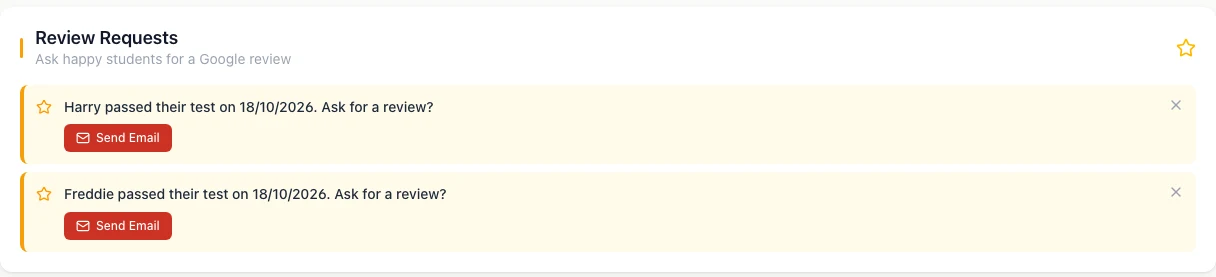
Almost every instructor knows they should ask for reviews. Very few do it consistently, and not through laziness — asking requires remembering, at the exact right moment, while driving to the next pickup. DriveSchoolPro does that half. Mark a pupil's practical test as passed and a short email goes out asking them to review you on Google, once, after a wait you choose. Anyone you have marked inactive shows up in a Review Requests list on your Today screen, ready for you to ask with one click. Over a year that is the difference between four reviews and forty.
Straight to your Google profile
Requests point at your Google Business Profile — the listing people actually see when they search for an instructor in your town — and the email comes from your school. We will not promise you a ranking; nobody honestly can. What the tool does is narrow and useful: it asks the right person at the right moment, so the ask stops depending on you remembering.
How it works
- 1
Connect your Google Business Profile
From settings. Without it the feature stays hidden, since there would be nowhere to send anyone.
- 2
Choose when it goes out
From immediately to three days after the pass. It is on by default and you can switch it off.
- 3
Mark the pass, or ask from Today
Marking a practical pass sends the request automatically. Pupils you have marked inactive appear in the Review Requests list on your Today screen, one click each.
Questions about review collection
When you mark a pupil's practical test as passed, DriveSchoolPro emails them a request to review you on Google. You choose how long it waits, from straight away up to three days; requests with a wait go out in a daily morning batch. It asks each pupil once, and only if they have an email address. Pupils you have marked inactive also appear in a Review Requests list on your Today screen, so you can ask them with one click.
For a practical pass, yes. It is on by default and you can switch it off in settings. If you would rather ask yourself, turn it off and use the Review Requests list on your Today screen instead: each pupil is one click, so you stay in control of who gets asked.
Not yet. The email is a short, friendly congratulations from your school's name with a button that opens your Google review page, and the wording is fixed. You can change when it is sent, or switch it off and ask in person or by message instead.
We would not promise that, and be sceptical of anyone who does. What we can say plainly is what the tool does: it sends review requests to your Google Business Profile at the moment a pupil is most likely to respond. What Google does with the result is Google's business.
Reviews are between the pupil and Google — nothing is filtered or intercepted, and it would be against Google's policies to try. A steady stream of genuine reviews is the best answer to an occasional poor one.
Let your finished pupils find you the next ones
Free until 31 March 2027. No card, no contract, cancel any time.
Get started free →Related
- Getting paid → — the pupils who finish are the ones who paid up front
- Progress tracking → — getting them test-ready in the first place
- SEO for driving schools → — the wider picture on getting found