Yes. DriveSchoolPro is on the App Store for iPhone and on Google Play for Android. Pupils who would rather not install anything can use the same account in a web browser.
For your pupils
A driving lessons app for your pupils, with your school's name on it.
Most of the messages an instructor gets are questions the pupil could answer themselves if they had the information. When is my next lesson? Where are you picking me up? How many lessons have I got left? Am I nearly ready for my test? The pupil app puts all of that on their phone, so they stop asking you at nine at night.
It is on the App Store and Google Play, and works in any web browser too.
Get started free →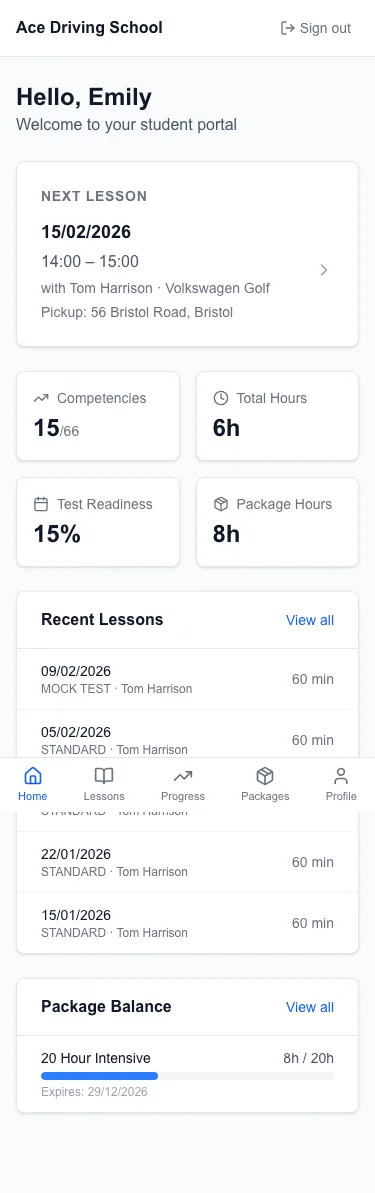
Everything about their next lesson, on the home screen
The first thing a pupil sees is their next lesson: the day, the time, the instructor and the car, the pick-up address, a button to call you and a button that opens directions to the pick-up point. Below it sit their progress, any balance they owe, how many lessons are left on their package, and a countdown to their driving test once a date is in.
Lessons, booking and changes
Pupils see their upcoming and past lessons, and each one shows the skills it covered. They can book from the times you are free, and cancel or move a lesson within the rules you set, so the notice period is enforced without you having to have that conversation.
Where you take card payments, they can pay for a lesson, settle an invoice or buy a block of lessons from the same screens.

Their progress, in the examiner's language
Pupils can see where they stand on each of the DVSA's 27 driving skills, grouped into the same eight categories, with an overall test readiness figure. It updates as you record each lesson. They can look but not change it.
That changes the conversation about test dates. A pupil who can see that roundabouts and parallel parking are still at "Helped" understands why you are not booking the test yet, without you having to argue the point.
A private line to their instructor
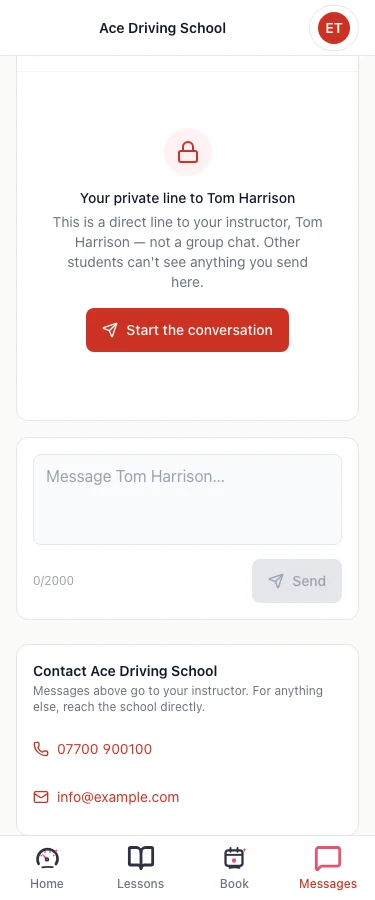
Pupils can message their own instructor from the app. It is a one-to-one conversation, not a group chat, and you get a notification and reply from your inbox rather than from your personal WhatsApp. Your school's phone number and email are on the same screen for anything else.
Keeping pupil messages out of your personal phone matters more than it sounds: they stay with the pupil's record, and they do not arrive in the middle of your family's evening.
What pupils do not see
Your private notes and the AI briefing you read before each lesson stay with you. Pupils cannot edit their own skill levels. And they only ever see their own lessons, messages and payments, never anyone else's.
How it works
- 1
Invite the pupil
From their record. They get an email with a link to set a password, or they can sign up on your school's page.
- 2
They download the app or use the browser
iPhone, Android or the web, with the same login.
- 3
Teach as normal
Bookings, progress and payments you record show up on their phone without any extra step.
Pupil app questions
Either you invite them from their record, which emails a link to set a password (it lasts 72 hours), or they sign up on your school's own registration page. After that they log in with their email and password, and can find your school by name if they forget the link.
No. Pupils see their DVSA skill levels and which skills each lesson covered, but not your private notes or the AI briefing written for you before each lesson. Progress is read-only for them: only you set the levels.
Related: How progress tracking works
Yes, as a private conversation with their own instructor. It is not a group chat, so other pupils never see it. You get a notification and reply from the Messages inbox. It is plain text rather than live chat, and pupils without an assigned instructor are pointed to the school's phone number and email instead.
Only if you allow it, and only outside the notice period you set (24 hours unless you change it). Inside that window the cancel and reschedule options are not available, so a late cancellation still has to come to you.
Related: Online booking rules
Yes, by card, once you have connected Stripe. They can pay an invoice, pay for a lesson, or buy a lesson package. Without Stripe connected they can still see what they owe, and pay you however you normally take money.
Related: Getting paid
Answer the nine o'clock questions before they are asked
Free until 31 March 2027. No card, no contract, cancel any time.
Get started free →Related
- Online booking → — the rules behind what pupils can book
- Progress tracking → — where the skill levels pupils see come from
- Lesson packages → — blocks of lessons pupils can buy in the app
- Driving instructor diary app → — the instructor's side of the same diary