Registration, make, model, year, colour, transmission and fuel; MOT, road tax and insurance expiry dates (with the insurer and policy number); last and next service dates; mileage; whether it has dual controls and when they were last checked; and free-text notes. A maintenance log records each job with its date, mileage, cost and who did it.
For schools with a fleet
Know which car is about to go out of date, before a lesson is booked in it.
One car is easy to keep track of. Five, each with its own MOT month, insurance renewal and service, is a spreadsheet nobody quite trusts. The usual way of finding out one has lapsed is a pupil in the passenger seat, which is the worst possible place to find out. Vehicle tracking keeps every date in one list and tells you ahead of time.
Get started free →Part of the School plan, for schools running more than one car.
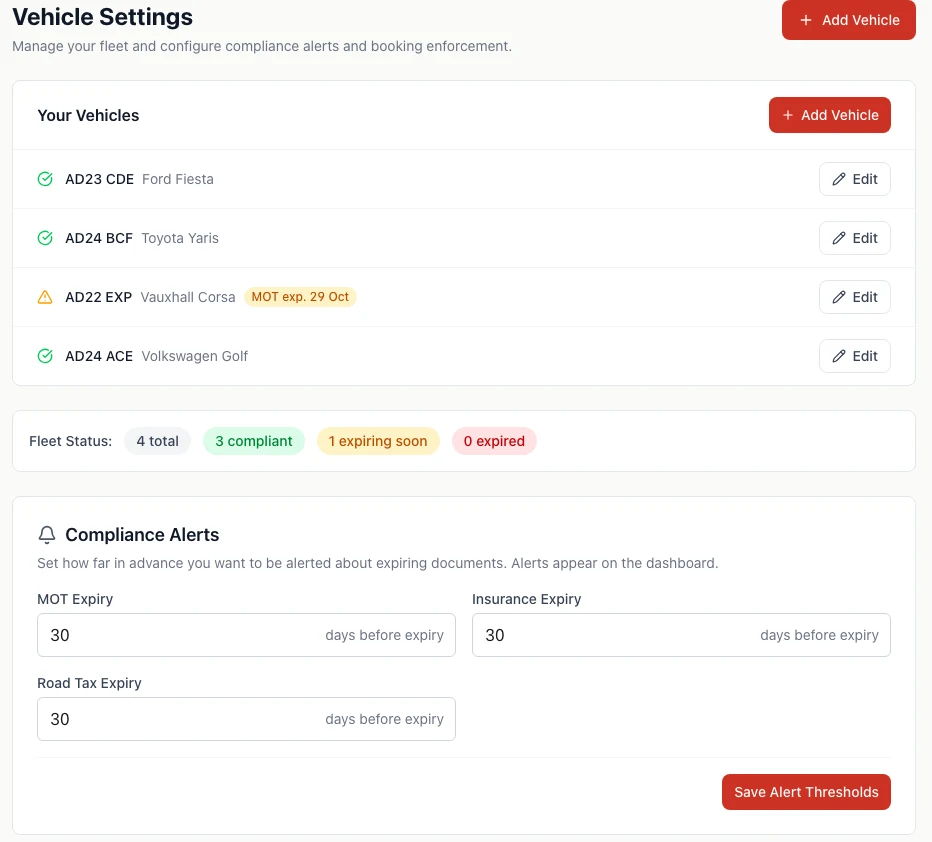
Every date in one place
Each car has its MOT, road tax and insurance expiry, its last and next service, its mileage, and whether it has dual controls and when they were last checked. A maintenance log keeps the history: what was done, when, at what mileage and what it cost.
For UK schools, typing the registration fills in the car's details and its MOT and tax status and expiry for you. That saves most of the typing when you add a car, and it avoids the transcription mistakes that make a reminder fire on the wrong day. Insurance you enter yourself.
Warned in time to do something about it
Set how far ahead you want to hear about MOT, insurance and road tax, separately, starting at 30 days. Any car that needs attention appears in a banner at the top of the Vehicles page with the document and the date, and the list marks it so you can see the fleet at a glance. A timeline view lays every renewal along a calendar, which makes it easy to see when two cars are due in the same fortnight and book them in one after the other.
Stop a lesson being booked in the wrong car
Driving a car on a public road without a valid MOT or insurance is illegal, and a school is the one that has to answer for it. So you can switch on three protections: do not allow lessons to be booked in a car with an expired MOT, expired insurance, or expired road tax. Once on, the booking is refused with a message saying why, and the car is bookable again as soon as you update the date.
Separately, every booking checks that the car is not already in use, in the same check that covers the pupil and the instructor, so a lesson cannot be set up in a car that is out with someone else.
What each car earns
A performance view shows, for each car over a date range you choose, how many lessons it has done, the hours, and the revenue. It will not tell you how much spare capacity you have, but it will show you which car is carrying the week and which one mostly sits on the drive.
How it works
- 1
Add each car
Type the registration to fill in the details, then add insurance and service dates.
- 2
Set your warning periods
How early you want to hear about each expiry. Thirty days is the starting point.
- 3
Switch on booking protection
Choose whether an expired MOT, insurance or tax stops lessons being booked in that car.
Vehicle tracking questions
Yes, for UK schools. Type the registration when adding a vehicle and it fills in the car's details along with its MOT and tax status and expiry dates. It is a lookup when you add or edit a car, so it does not keep checking in the background, and insurance is always entered by you.
You set a warning period for MOT, insurance and road tax separately, and it starts at 30 days. The Vehicles page puts any car needing attention in a banner at the top, with the document and the date, and the vehicle list marks it too.
Yes, if you switch it on. There are three separate options: block bookings on a vehicle with an expired MOT, with expired insurance, or with expired road tax. A lesson that breaks one of them cannot be booked until the document is renewed and updated. They are off until you choose them.
Yes. When you create or move a lesson, the diary checks the pupil, the instructor and the car, and tells you which one is already committed and when.
Related: How scheduling works
No. It is part of the School plan, for schools with more than one car and instructor. A solo instructor on the Free or Solo plan does not see the vehicles section. Early access is free for schools too, until 31 March 2027.
Related: See pricing
Find out about the MOT before your pupils do
Free until 31 March 2027. No card, no contract, cancel any time.
Get started free →Related
- Scheduling → — the diary checks the car as well as the pupil
- Online booking → — pupils booking themselves into free slots
- Driving school management software → — running a multi-instructor school
- Driving school software for UK schools → — plans and pricing for a team